Step 1
Upload footage from desktop
No phone transfer required. Upload your recordings directly from desktop. Editly handles full-length interviews and tutorials.
Editly AI
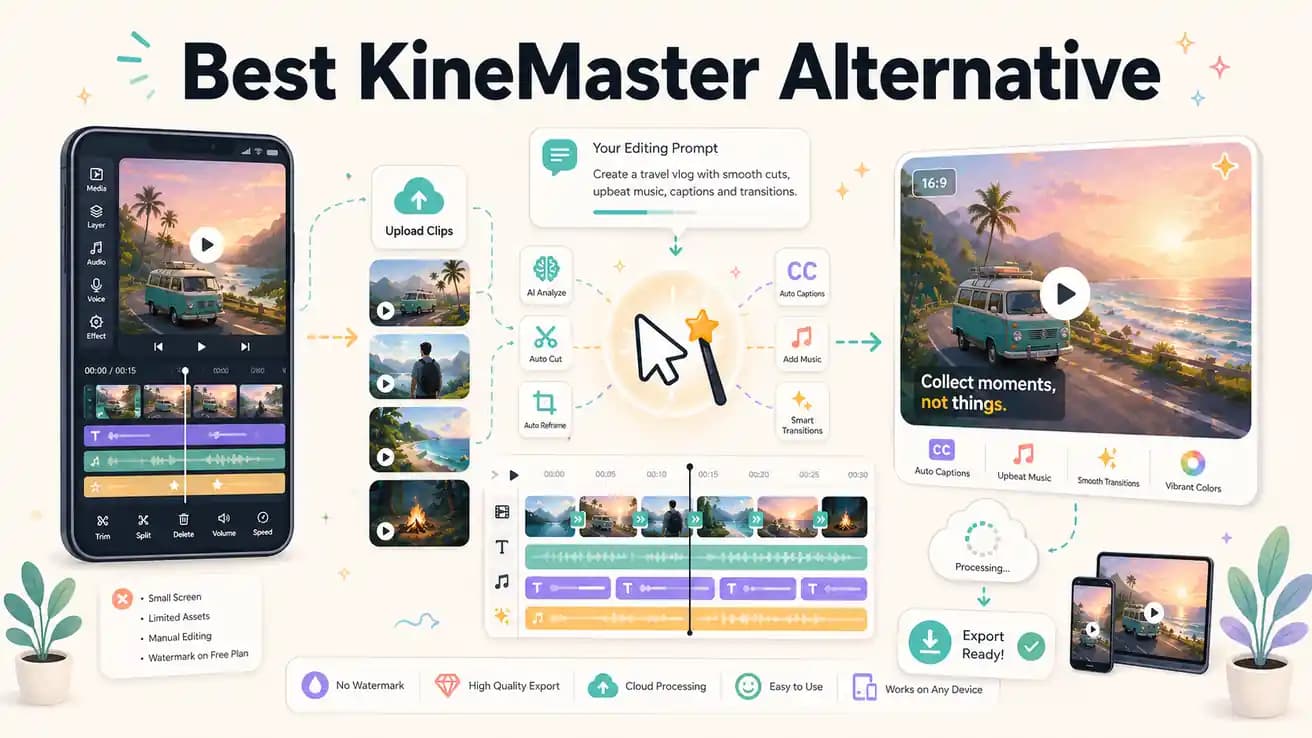
Editly runs in mobile browsers on Android but is optimized for desktop use. KineMaster's Android app is more polished for on-device mobile editing. Editly's advantage is the AI editing layer and the ability to process full-length footage without phone storage or performance limitations.
Compared on the key differences that matter for high-volume content creation and footage-based editing workflows.
| Decision | KineMaster | Editly |
|---|---|---|
| Platform | KineMaster: iOS and Android only — no desktop or web browser version for full editing | Editly: any browser on any device — desktop-first with mobile browser support |
| Watermark removal | KineMaster: free version exports with KineMaster watermark — subscription required to remove | Editly: free tier exports 3 clean videos without watermark; Pro $28/month for 100 exports |
| Silence removal | KineMaster: no automatic silence removal — requires manual scrubbing on mobile timeline | Editly: silence removal is a prompt instruction — applied automatically to the full recording |
| Editorial AI | KineMaster: powerful manual tools — all editorial decisions (what to cut, what to keep) are made by you | Editly: Gemini AI analyzes footage and makes editorial decisions according to your prompt |
Step 1
No phone transfer required. Upload your recordings directly from desktop. Editly handles full-length interviews and tutorials.
Step 2
Replace the mobile timeline with a single instruction: 'Keep the best 5 minutes, remove silences, add captions, export 9:16 for TikTok.' Done.
Step 3
Editly processes your footage in the cloud. The output is a finished, edited video — no phone render required.
Step 4
Adjustments are a follow-up prompt. No mobile interface to navigate, no layer adjustment on a small screen.
If you're editing footage (not compositing mobile game videos), test Editly on one clip. Upload, write a prompt, get a finished video. 3 exports free.